




3DEXPERIENCE and CATIA Training Passports
The most cost effective way to purchase training
A PASSPORT TO SUCCESS
What is an Enterprise Training Passport?
Our Enterprise Training Passport is a bundle that provides a simple cost-effective way to purchase training courses. Our Training Passports offer you a comprehensive training and development plan in one single purchase.
Our Training Passports allow you to make massive savings on training, compared to purchasing multiple courses separately.
At TriMech Enteprise, we offer two types of Enterprise Training Passports for 3DEXPERIENCE and CATIA courses, both of which are available on a 1, 2, 3, or 5 year term.
Our Training Passport Options:
- 3DEXPERIENCE and CATIA Training Passport
- 3DEXPERIENCE and CATIA Training Passport Upgrade from Foundation
A Training Passport offers an efficient, cost-effective solution for businesses and individuals looking to maximize their training opportunities. By purchasing our 3DEXPERIENCE and CATIA Training Passport, you gain access to a range of benefits that help streamline professional development, improve skillsets, and support long-term growth.
- Cost Savings:
The biggest advantage of a Training Passport is the significant cost savings. Instead of paying for individual courses at full price, the Training Passport allows you to bundle training sessions at a discounted rate. This is ideal for businesses looking to upskill multiple employees or for professionals seeking ongoing education at a lower cost..
- Access to a Range of Courses:
With a Training Passport, you have access to a wide selection of training programs, often covering diverse topics and software applications.
- Simplified Administration:
For companies, managing employee training can be time-consuming. Our Training Passport simplifies this process by allowing you to manage multiple courses and training sessions under one centralized package. This reduces administrative complexity and makes it easier to track progress and utilization.
- Encourage Continuous Learning
A Training Passport encourages continuous professional development by giving you a set period to use your credits, motivating you to keep learning and developing new skills. It promotes a learning culture within organizations, helping employees stay engaged and proactive in improving their expertise.
- Predictable Budgeting
For businesses planning ongoing employee development, a Training Passport offers predictable budgeting. Instead of facing unexpected training costs throughout the year, the upfront investment in the passport ensures a fixed price for a range of courses, allowing better financial planning.
- All of our courses are Certified and Industry Recognised
- All of our Trainers are Experts with decades of hands-on industry expertise
- We offer both in-person and online training solutions to support your requirements
- An Enterprise Training Passport entitles the named employee to sit any CATIA V5 or 3DX training within the duration of the passport
- Enterprise Training Passport is only valid for public training courses
- The duration starts from the start date of the first course taken
- The Enterprise Passport may be transferred once from the named employee to a replacement if the original holder ceases employment within the passport term (or twice if 5-year Passport).
- Passport holders will be entitled to attend any course outlined in their purchased passport regardless of the software license they operate. This will allow the chance to evaluate products beyond their current capability should they wish to upgrade their license at a later date.
- Passports are payable net 30 days from order

What Courses are Included?
We offer two separate training passport bundles, one focused on CATIA V5 and the other on 3DEXPERIENCE CATIA, explore the courses included below.
CATIA V5 Training Passport
Total: 34 Days
Duration: 1 Day
Our CATIA V5 Digital Mock-Up Basics training course will explain the features of all CATIA V5 Digital Mock-up workbenches. It will help you to analyze and choose an appropriate workbench as per the requirement.
You will learn to view and inspect a complex assembly in order to investigate the problem areas and highlight critical points.
This course is scheduled by arrangement and can be arranged for one-on-one training, group session, on-site or on-premise.
Duration: 4 Days
Duration: 4 Days
This CATIA V5 Foundation Plus training course introduces the trainee to the advanced concepts behind Part Design, Assembly Design and Drafting.
Suitable for the new user, self-taught engineers and users coming from other 3D CAD packages.
Duration: 2 Days
The CATIA V5 Interrogators training course teaches students how to interrogate and capture information from existing Parts, Drawings and Assemblies using CATIA V5 on this 2-day course.
The course is not intended to teach the creation of CATIA parts, drawings and assemblies and is purely for the extraction of engineering information.
However, the course will include some simple part, drawing, and assembly creation to aid understanding.
Duration: 3 Days
Duration: 2 Days
This CATIA V5 3D Functional Tolerancing & Annotation training course will teach you how to create annotation planes in a CATPart and how to add and manage 3D annotations on these planes.
Learn how to create 3D views in the CATPart and how to use them to create 2D views in a CATDrawing.
Duration: 5 Days
Duration: 4 Days
This 4-day CATIA V5 Electrical Harness Design & Documentation training course teaches you the complete electrical harness design and drafting workflow, from setting up the CATIA environment for electrical design work to detailed 3D harness design and drawing creation.
Duration: 2 Days
This CATIA V5 Kinematics course is based on the DMU Kinematics workbench functionality provided by the KIN product.
The course will teach you how to build working mechanisms by defining mechanical joints between assembly components and driving “commands” by which the mechanism can be manipulated.
You will learn how to simulate the mechanism to study its motion and carry out various analyses to evaluate the mechanism design.
Duration: 2 Days
This Fundamental CATIA V5 Sheet Metal Design (SMD) course will teach you how to design a sheet metal part using associative feature-based modeling.
Suitable for the new user, self-taught engineers and users coming from other 3D CAD packages.
Design a sheet metal part using associative feature-based modelling; Learn how to integrate both standard and user-defined stamped features into your designs and calculate the resulting flat patterns in accordance with either the standard bend allowances or your company’s bend allowance tables.
Duration: 5 Days
The CATIA V5 Machining training course covers both standard and advanced machining techniques over 5 days.
Participants will learn to create manufacturing programs, simulate and generate outputs, manage prismatic (2.5 axis) and 3-axis machining operations for parts designed with surface or solid geometry.
The course also delves into advanced topics such as multi-axis machining techniques for complex 3D parts and free-form shapes, as well as defining 5-axis machining operations.
3DEXPERIENCE Training Passport
Total: 33 Days
Duration: 0.5 Days
This introductory gateway course is the entry point to the 3DEXPERIENCE® platform.
Its purpose is to empower users of the platform by teaching them how to access their work environment, navigate, search, work on their data, use and manage their dashboard and collaborate with their peers, thanks to communities.
During the 3DEXPERIENCE Platform Basics training course, you will learn how to navigate the interface and functionalities, connect to the platform, manage your projects, search documents and share content along with knowledge or skills with other users.
Short videos will show you how to search and visualize the results, explore or open your 3D data, filter the data, manipulate the tree, use the basic functionalities (section, favourites, change view, etc).
Duration: 5 Days
The 3DEXPERIENCE CATIA Foundation course is aimed at Mechanical and Sheet Metal Designers and will teach you how to create simple parts, assemblies and drawings.
Use different feature-based tools to build, review and modify a model and learn how to create and analyse assemblies and how to produce a drawing with different views. Finally, you will learn how to dimension the drawing and annotate the views.
As part of this course, you will learn how to use the ENOVIA Collaborative Lifecycle application to manage the complete lifecycle of an object in order to achieve concurrent engineering. In addition, you will also learn how to collaborate using the platform’s various applications to deploy a single source of truth collaborative environment.
Duration: 4 Days
The 3DEXPERIENCE CATIA Foundation Plus training course explores advanced sketching and surface-based modelling techniques.
Learn to use a variety of 3DEXPERIENCE apps to complement your design processes, discover how to manage complex assemblies and use advanced drafting tools.
Duration: 4 days
The 3DEXPERIENCE CATIA Electrical 3D Design training course provides you with a guided and systematic approach to learn about the Electrical 3D Systems Designer role.
It covers knowledge and know-how related to synchronization of the logical and the physical design. It will teach you about creation of electrical branch geometries and routing wires through the branch geometries.
This learning path also provides the opportunity to practice the various functionalities that you have learned.
Duration: 2 Days
This 3DEXPERIENCE CATIA 3D Functional Tolerancing & Annotation training course will teach you how to annotate a 3D Part using the 3D Tolerancing and Annotation App.
You will learn how to create annotation planes and manage 3D annotations on these planes.
Also how to create 3D views and use them to create 2D drawings views. We will then transfer these skills to assembly models.
Duration: 2 Days
This 3DEXPERIENCE CATIA Kinematics learning path provides you with a guided and systematic approach to learn about the Mechanical Motion Designer role.
You will learn and practice the functionalities related to the assembly design, mechanisms, kinematics scenarios and static study analysis.
Duration: 2 Days
This 3DEXPERIENCE CATIA Composites course you will discover and practice the key capabilities of the Airframe Composites Designer role. You will also learn how to design composites parts using the Manual and Grid Approach.
The CATIA Composites Design app offers composites design engineers with a complete set of process-oriented features to engineer composites parts. This learning module lets you practice the various approaches used to design a composites part.
Duration: 2 Days
This 3DEXPERIENCE CATIA Sheet Metal Design course will teach you how to use the Bent Part Design app to create and modify a sheet metal part. You will learn how to define the sheet metal parameters and create features such as walls, bends, cut outs and corners.
You will also learn different techniques for multi-selecting the objects and constraining the parts. In this module, you learn to simplify and accelerate the hydroformed sheet metal part design process with ready-to-manufacture parts. You will also learn to optimize the design and validate it.
Duration: 2 Days
This Mechanical Designer 3DEXPERIENCE Transition course addresses the needs of mechanical designers.
Learn how to design a new part with the 3DEXPERIENCE platform. You will also learn how to compute weight, create a new part version, replace the original and create a drawing.
Finally, you will learn how to manage complex product structures, create product features, manage catalogues and analyse assemblies.
Duration: 1 Day
This Surface Designer 3DEXPERIENCE Transition course addresses the needs of surface designers.
Learn how to design a new part with the 3DEXPERIENCE platform. You will also learn how to create a new part version, replace the original part and update the product.
Duration: 3 Days
This fundamental 3DEXPERIENCE for Surface Designers course addresses the needs of Surface Designers, who need to work with styled parts.
It will first teach you how to design a new part with the 3DEXPERIENCE platform and you will also learn how to create a new part version, replace the original part, and update the product.
As part of this course, you will learn how to use the ENOVIA Collaborative Lifecycle application to manage the complete lifecycle of an object in order to achieve concurrent engineering. In addition, you will also learn how to collaborate using the platform’s various applications to deploy a single source of truth collaborative environment.
Our Recommendations
What course should you take next?
Our training passports provide access to a large range of courses, if you aren't sure which course you should take next to continue your professional development, then take a look at our recommended training pathway graphics. Click to view these in full screen.
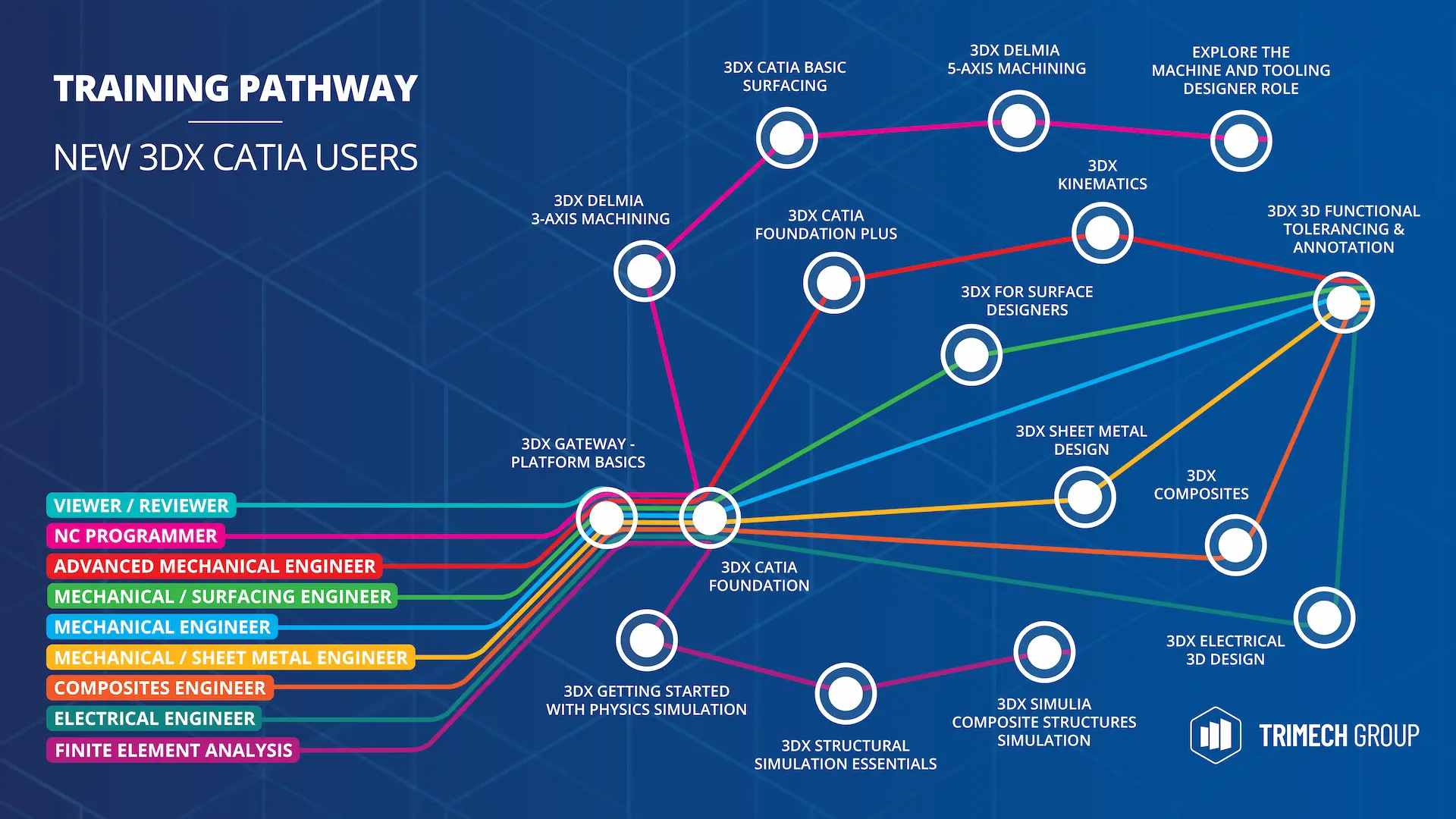
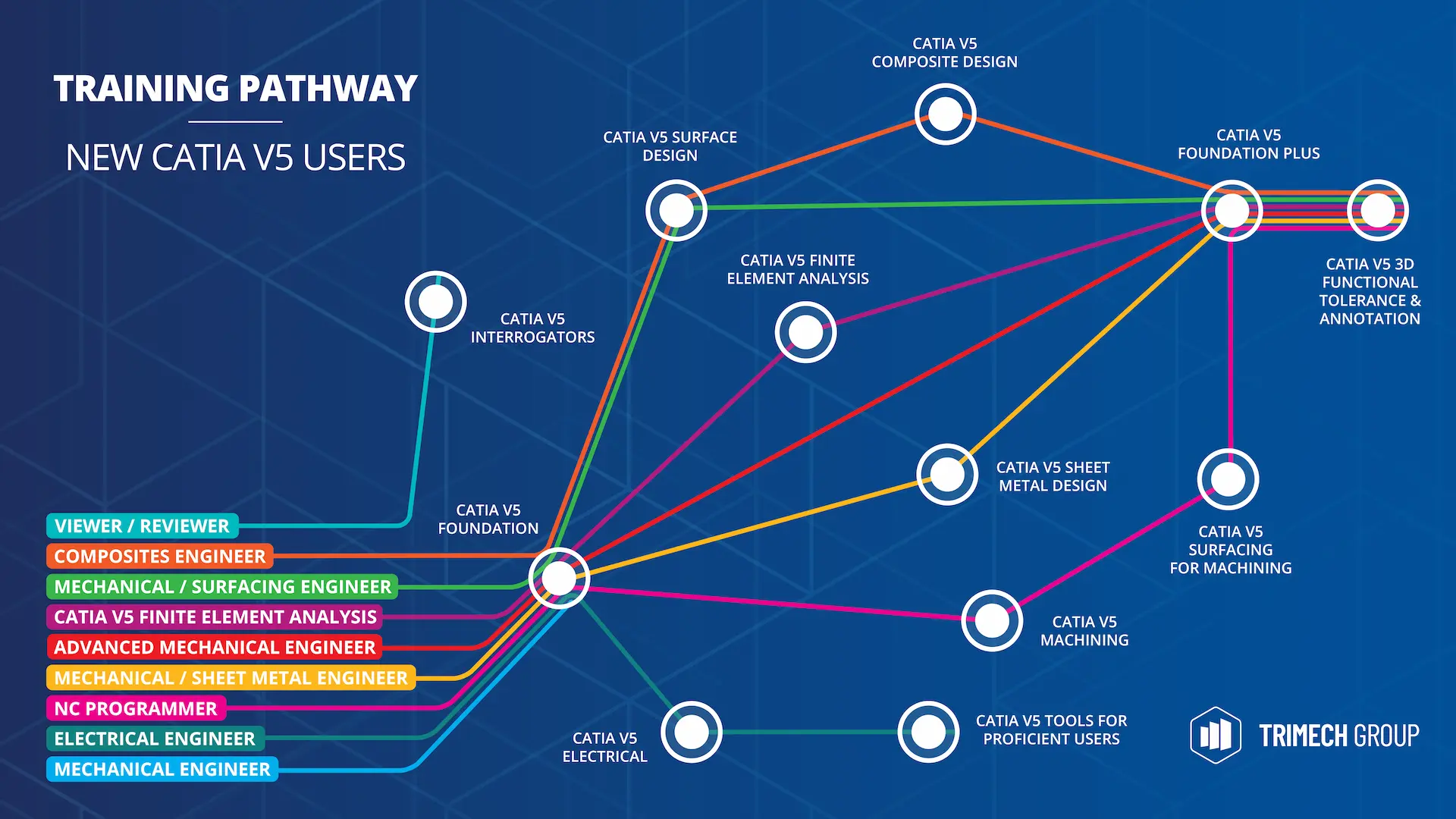
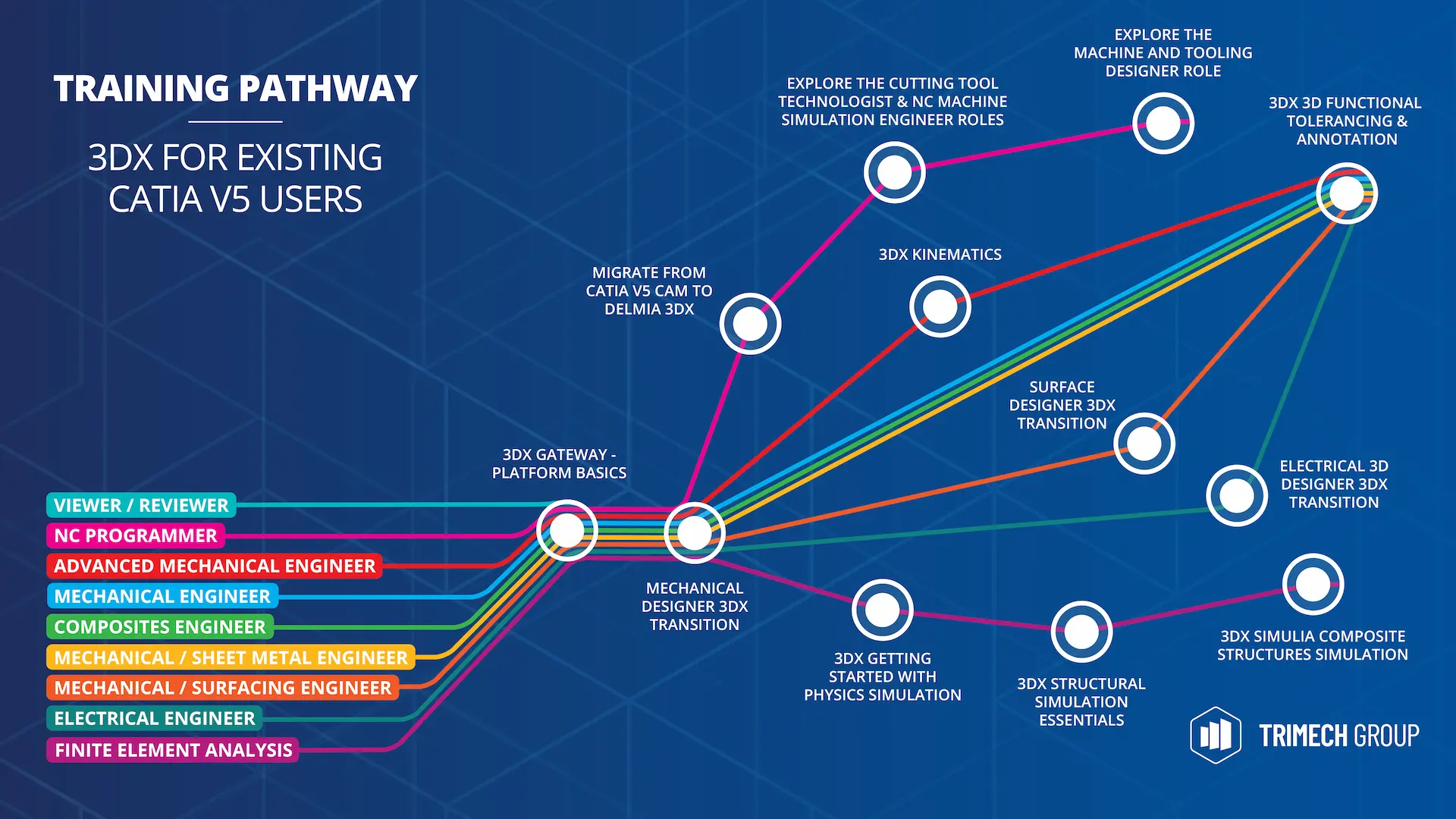
If you have any questions, why not contact a training expert? Our training team are always happy to discuss your requirements and recommend courses that will benefit you and your company the most.
Features & Benefits of Training
Discover the benefits of professional, instructor-led training over eLearning content.
Industry Relevant Skills
Training is aligned with the latest industry standards and software, ensuring learners gain practical skills that are immediately applicable in professional settings.
Live Instruction from Certified Trainers
Certified instructors pass on their experience and provide best practices and tips in a classroom learning environment.
More Effective than eLearning Training Videos
Our training provides an expert instructor to help you and answer your questions. With eLearning content, students are often not as focused on the training and may skip exercises.
Certificate of Completion
Earn a certificate of attendance to boost your credentials and take the next step toward passing your certification exams with confidence.
Live Access to the Instructor
Get instant answers to your questions and network with fellow professionals across a variety of industries.
It’s Hands-on Practical Training
You get plenty of time to try out the exercises and learn by using your CATIA or 3DEXPERIENCE software. Training is delivered on your software with your business setup.
Interested in a training passport?
Whether you have questions or are looking to purchase our friendly team is here to help. Contact us using the number or button below.
US 440.257.7460 | UK 01926 333777